Posts

Showing posts with the label Lightning Component

AuraConditionalRendering

When Checkbox is true Education is displayed   <aura:application   extends = "force:slds" >      <aura:attribute   name = "variable"   type = "Boolean"   />      <lightning:input   aura:id = "Education"   type = "checkbox"                      label = "Education"                        name = "Education"   value = "Education"             onchange = "{!c.handleCheck}"   />                                <aura:if   isTrue = "{!v.variable}" >          <div> Se...
AuraLocales

 Locales <aura:application extends="force:slds">     {!$Locale.language}<br/>     {!$Locale.timezone}<br/>     {!$Locale.numberFormat}<br/>     {!$Locale.currencyFormat}<br/> </aura:application> ({     checkDevice: function(component) {     var locale = $A.get("$Locale.language");     alert("You are using " + locale);     } }) O/p en America/Los_Angeles #,##0.### ¤#,##0.00;(¤#,##0.00)

AuraAttributes

Binding attribute in Application <aura:application   extends = "force:slds" >      <aura:attribute   name = "value"   type = "String"   default = "World" />     Hello {!v.value}! </aura:application> O/p Hello  World ! Hello World example sending value from js to server as param and getting output. Apex public  with sharing  class   helloWorldwithParam  {      @AuraEnabled      public   static   String   serverEcho ( String   firstName ) {          return  ( 'Hello from the server, '  +  firstName );     } } Application <!-- Adding classname of apexclass -->  <aura:application controller="helloWorldwithParam" extends="force:slds">     <aura:attribute name="firstName" type="String" default="...

ToastMessage

 showInfoToast : function(component, event, helper) {         var toastEvent = $A.get("e.force:showToast");         toastEvent.setParams({             title : 'Info Message',             message: 'Mode is dismissible ,duration is 5sec and this is normal Message',             messageTemplate: 'Record {0} created! See it {1}!',             duration:' 5000',             key: 'info_alt',             type: 'info',             mode: 'dismissible'         });         toastEvent.fire();     },     showSuccessToast : function(component, event, helper) {         var toastEvent = $A.get("e.force:showToast");         toastEvent.setPar...

Comparing Two Values Using Aura If

<aura:application >     <aura:attribute name="items" type="List" default="[1,2,3]" />     <aura:attribute name="current" type="Integer" default="2" />     <aura:iteration items="{!v.items}" var="item">         <aura:if isTrue="{!v.current == item}">             <div>Current: {!item}</div>             <aura:set attribute="else">                 <div>Not Current: {!item}</div>             </aura:set>         </aura:if>     </aura:iteration> </aura:application> Output Not Current: 1 Current: 2 Not Current: 3

Array to push element to array

mpex_app.app <aura:application extends="force:slds">   <c:mpex1></c:mpex1> </aura:application> CMP <aura:component>   <aura:attribute name="objs" type="Object[]" />   <aura:handler name="init" value="{!this}" action="{!c.doInit}" />   <table>     <tr>       <th>Product</th>       <th>Price</th>     </tr>     <aura:iteration items="{!v.objs}" var="obj">       <tr>         <td>{!obj.product}</td>         <td>{!obj.price}</td>       </tr>     </aura:iteration>   </table>   <!-- component B -->   <lightning:button variant="brand" label="Add another" title="Brand action" onclick="{! c.handleClick }" /> </aura:component> JS ({ ...

Multiple Checkboxex with default as true

toggle_smle_app.app <aura:application extends="force:slds">     <aura:attribute name="allaccounts" type="List" default="[ { BillingCity: 'Denver' }, { BillingCity: 'Ontario' }, { BillingCity: 'San Francisco' } ]" />     <aura:attribute name="selectedCities" type="List" default="[]" />     <aura:iteration var="a" items="{!v.allaccounts}" indexVar="indx">         <ui:inputCheckbox aura:id="checkbox"                           value="true" text="{!a.BillingCity}"                           name="{!indx}"                           label="{!a.BillingCity}"                           change="{!c.selectoptionvalue}"/>     </aura:iterat...

Onclick of button iterate and display map from server to client side controller

Aura Class public class SampleAuraController {   @AuraEnabled     Public static Map<string, List<string>> getMap(){         Map<String, List<string>> mapObj = new Map<String, List<string>>();         List<string> fruits = new List<String>{'Apple', 'Orange', 'Banana', 'Grapes'};         List<string> vegetables = new List<String>{'Cabbage', 'Carrot', 'Potato', 'Tomato'};         mapObj.put('Fruits', fruits);         mapObj.put('Vegetables', vegetables);         return mapObj;     } } c:SampleAuraController <aura:component controller="SampleAuraController">     <aura:attribute name="mapValues" type="object" />     <div class="slds-m-around_xx-large">         <div class="slds-box slds-theme_default"> ...

Onclick of button through iteration shows index

test_a.app <aura:application extends="force:slds">    <ul>         <aura:iteration items="[a1,a2,a3,a4]" var="product" indexVar="index">             <li onclick="{!c.ShowDataOnClick}" data-row-index="{!index}">                 <p>{!product}</p>                           </li>         </aura:iteration>     </ul> </aura:application> ({         ShowDataOnClick: function(component, event, helper) {            var index = event.currentTarget.dataset.rowIndex;             console.log(index);             console.log(event.currentTarget.dataset.rowIndex);         }     }) O/p [a1...

Attributes

Label Hidden Used to hide the label                    <lightning:input type="number" label="number" variant = "label-hidden" name="aNumberInputField"/> <aura:component >     <lightning:recordEditForm objectApiName="Account">         <lightning:messages />             <div class="slds-grid">                <div>                 <div class="slds-col slds-size_1-of-3">                    <lightning:input type="number" label="number" variant = "label-hidden" name="aNumberInputField"/>                 </div>                <div class="slds-col slds-size_1-of-3">           ...

Toggle

Image
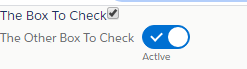
ToggleButton.cmp <aura:component >     <aura:attribute name="box1" type="Boolean" default="true" />     <aura:attribute name="box2" type="Boolean" default="true" />       <aura:handler name="change" value="{!v.box1}" action="{!c.logChange1}" />     <aura:handler name="change" value="{!v.box2}" action="{!c.logChange2}" />       <ui:inputCheckbox value="{!v.box1}" label="The Box To Check" />     <lightning:input name="box2" type="toggle" checked="{!v.box2}" label="The Other Box To Check" />   </aura:component>  ToggleButtonController.js ({ logChange1: function(component, event, helper) {     console.log(component.get("v.box1")); }, logChange2: function(component, event, helper) {     console.log(component.get("v.box2")...

Showing Error from ServerSide controller in UI using Lightning Components

Image
Error In Server Side Controller --- Error Exception happendInvalid field Count for AggregateResult ServerSide Controller public class Agg_exam_opp {      @AuraEnabled     public Static list<aggregateresult> aggEx()     {         try{             list<aggregateresult> aggres=[SELECT StageName Name,Count(Id) Cnt FROM Opportunity GROUP BY Stagename];              for(aggregateresult agg:aggres)             {                 System.debug('avgval'+agg.get('Name'));                 System.debug('conval'+agg.get('Count'));     ...